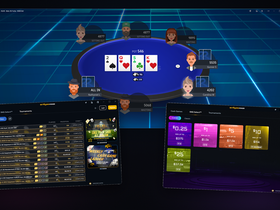


Pot Limit Omaha has grown tremendously in terms of popularity in the last few years. That growth has resulted in increased demand for poker training sites and software solutions aimed specifically at the four-card game. One of these is the PLO Trainer, a Pot Limit Omaha poker solver developed by PLO Mastermind.
Although the software has been around for a while, the team behind it introduced a number of significant changes over the course of 2026, with some of the most significant ones coming in over the last few weeks.
So, for anyone out there looking to add some tools to their PLO learning arsenal, here’s a summary of the most important changes and improvements that can help you decide if this is the right tool for your studying needs.
On-Demand Solves in Your Browser
Perhaps the most important development to the PLO Trainer is the introduction of on-demand solutions that you can run in your browser. The process is based on real CFR (Counterfactual Regret Minimization) running on your machine, even if the library doesn’t contain your specific spot.
This means that players can now solve any turns and rivers, and the software is showing the exploitability on screen, allowing you to see how precise the actual solution is. If you have the need to take a deep dive into some unusual spots, you can do it and get results you can trust.
You have control over how deep you want the poker solver to go. Deeper analysis can take longer to complete, but it may be needed in some spots. In other cases, you can go with lower depth options (Preview or Balanced).
To make the studying process even more convenient, the PLO Trainer now also lets you import your solutions from MonkerSolver. Once imported, you can work with them using the full toolset available in the software, providing a much more user-friendly interface.
Personal Stats to Combat Your Losses
Another great feature that was introduced to the PLO Trainer software earlier this year is the personal Stats Dashboard. The main idea behind it is to point players in the right direction and show them areas of their game that are lacking and habits that are costing them money.
The dashboard shows every hand you train, displaying accuracy and the average EV loss (shown as a percentage of the pot), all broken down by different actions (open raising, 3-betting, defending blinds, etc.).
Over a large enough sample, this approach provides a very targeted way to study your game. While it can be a bit uncomfortable at first, it tells you exactly where your leaks are and what areas of your game need the most work.
The training section has also seen a number of improvements over the last few months. Back in February, the software rolled out support for multi-tabling training with 25-second timers, making the experience much more lifelike.
In March and April, PLO Trainer added custom filters and the suit expansion, expanding on the strategic mode.
Finally, in May, the software saw one of the most significant improvements, as the multi-street training was rolled out. The feature allows you to play a hand from flop to river in a continuous flow, with the ability to reveal your opponents’ cards at the end. The main idea is to close the gap between training and playing, making the training process much more similar to actual poker situations.
All in all, the PLO Trainer has been through many big improvements in recent months, and if it’s been a while since you last checked the software, it might be worth revisiting.